Mesh & render
Three verbs cover the tessellation-to-preview pipeline: mesh tessellates a B-rep solid and returns quality metrics; simplify-mesh decimates that mesh to a target triangle budget; and render-preview produces a headless PNG from one or more BREPs with configurable camera, display mode, and AIS overlays. Each step is a single occtkit call that reads a BREP file and writes JSON to stdout.
Step 1 — Tessellate and inspect quality
mesh runs BRepMesh_IncrementalMesh and returns triangle and vertex counts alongside four quality metrics. Omit --output to get inline geometry (up to the 100K-triangle threshold); supply it to write a .stl or .obj and suppress the vertex arrays.
--linear-deflection (mm) is the primary knob — smaller values produce more triangles and a more faithful surface. --angular-deflection (radians) caps the angle between adjacent triangle normals and matters most on curved faces. Run metrics-only first to calibrate before committing to a file write.
occtkit mesh part.brep \
    --linear-deflection 0.05 \
    --angular-deflection 0.3 \
    --parallel \
    --no-return-geometry
{
  "triangleCount": 8214,
  "vertexCount": 4112,
  "quality": {
    "minAspectRatio": 1.04,
    "meanAspectRatio": 2.11,
    "degenerateTriangles": 0,
    "nonManifoldEdges": 0
  },
  "geometry": null,
  "outputPath": null
}
minAspectRatio and meanAspectRatio are longest-edge / shortest-edge per triangle (≥ 1; lower is better). degenerateTriangles counts near-zero-edge triangles; nonManifoldEdges counts undirected edges shared by a number of triangles other than exactly 2 — both should be 0 for a manifold solid.
Once the metrics look good, add --output to write the fine mesh for archiving:
occtkit mesh part.brep \
    --linear-deflection 0.05 \
    --angular-deflection 0.3 \
    --output /tmp/part_fine.stl
{
  "triangleCount": 8214,
  "vertexCount": 4112,
  "quality": {
    "minAspectRatio": 1.04,
    "meanAspectRatio": 2.11,
    "degenerateTriangles": 0,
    "nonManifoldEdges": 0
  },
  "geometry": null,
  "outputPath": "/tmp/part_fine.stl"
}
Step 2 — Decimate with simplify-mesh
simplify-mesh runs QEM decimation via OCCTSwiftMesh and always writes a file — --output is required. Target the triangle budget with --target-reduction (fraction to remove, 0.0–1.0) or --target-triangle-count (absolute cap); supply exactly one.
--max-hausdorff-distance acts as a quality gate: the verb aborts if the geometric deviation between original and decimated meshes exceeds the threshold. --preserve-boundary locks seam edges; --preserve-topology prevents genus changes. Both default to true.
occtkit simplify-mesh part.brep \
    --linear-deflection 0.05 \
    --target-reduction 0.75 \
    --max-hausdorff-distance 0.2 \
    --output /tmp/part_lod.obj
{
  "beforeTriangleCount": 8214,
  "afterTriangleCount": 2054,
  "qualityDelta": {
    "meanAspectRatioDelta": 0.18,
    "hausdorffDistance": 0.14
  },
  "outputPath": "/tmp/part_lod.obj"
}
hausdorffDistance is the achieved geometric deviation in input units. Check it against your tolerance budget: if it is close to --max-hausdorff-distance, either loosen --target-reduction or tighten --linear-deflection on the upstream tessellation step to give the decimator more triangles to work with.
meanAspectRatioDelta is post-mesh minus pre-mesh mean aspect ratio — a positive value means quality improved (the decimator produced more equilateral triangles on average).
To hit an absolute triangle count instead:
occtkit simplify-mesh part.brep \
    --target-triangle-count 1000 \
    --output /tmp/part_web.stl
Step 3 — Headless PNG preview
render-preview wraps OCCTSwiftViewport’s OffscreenRenderer. It loads one or more BREPs, converts each to a ViewportBody, fits a camera, and writes a PNG. The verb requires a Metal device — it runs on any Mac with Apple silicon or a discrete GPU; CI runners without Metal should omit this step or mock the output.
A standard iso-view render with edge overlay:
occtkit render-preview part.brep \
    --output /tmp/part_iso.png \
    --camera iso \
    --display-mode shaded-with-edges \
    --background light \
    --width 1200 \
    --height 900
{
  "outputPath": "/tmp/part_iso.png",
  "width": 1200,
  "height": 900,
  "mimeType": "image/png"
}
Axis overlay
Add --show-axes to place an AIS Trihedron. The default --axes-position outside anchors the trihedron 20 % of the bbox diagonal beyond the bbox-min corner, keeping all three arrows visible regardless of where the part sits in world space. Use origin to fix the trihedron at (0, 0, 0), center to place it at the bbox centre, or explicit x,y,z coordinates:
occtkit render-preview part.brep \
    --output /tmp/part_axes.png \
    --camera front \
    --display-mode shaded \
    --show-axes \
    --axes-position outside
Highlight a sub-shape
--highlight extracts sub-shapes from the first input BREP and renders them in the highlight colour (default orange #ffa500). Sub-shape indices match those emitted by query-topology for cross-reference:
occtkit render-preview part.brep \
    --output /tmp/part_face.png \
    --camera iso \
    --display-mode shaded-with-edges \
    --highlight face[3],edge[7] \
    --highlight-color "#ff4400"
{
  "outputPath": "/tmp/part_face.png",
  "width": 800,
  "height": 600,
  "mimeType": "image/png"
}
Render a multi-BREP scene
Pass multiple BREP paths to composite them into one frame — useful for assembly previews. Sub-shape --highlight applies to the first input only; render that body solo if you need to highlight it within the scene.
occtkit render-preview housing.brep cover.brep shaft.brep \
    --output /tmp/assembly_iso.png \
    --camera iso \
    --display-mode shaded-with-edges \
    --background dark \
    --width 1600 \
    --height 1200
{
  "outputPath": "/tmp/assembly_iso.png",
  "width": 1600,
  "height": 1200,
  "mimeType": "image/png"
}
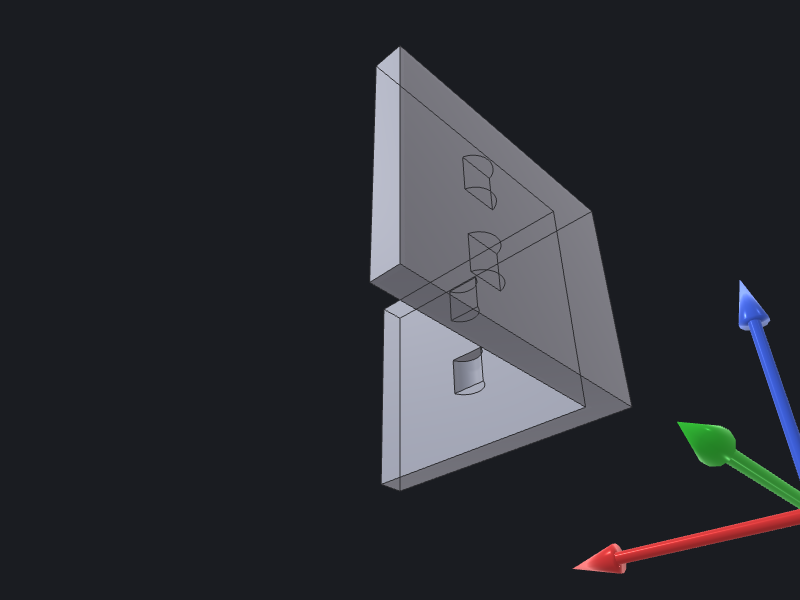
Example output
Putting it together
A full tessellate-decimate-preview pipeline for a single part:
# 1. Check tessellation quality.
occtkit mesh part.brep \
    --linear-deflection 0.05 --angular-deflection 0.3 \
    --no-return-geometry

# 2. Write the fine mesh if metrics are acceptable.
occtkit mesh part.brep \
    --linear-deflection 0.05 --angular-deflection 0.3 \
    --output /tmp/part_fine.stl

# 3. Produce a lightweight LOD mesh for the web viewer.
occtkit simplify-mesh part.brep \
    --linear-deflection 0.05 \
    --target-reduction 0.75 \
    --max-hausdorff-distance 0.2 \
    --output /tmp/part_lod.obj

# 4. Render a PNG preview with axes.
occtkit render-preview part.brep \
    --output docs/guides/cookbook/images/render-preview-demo.png \
    --camera iso \
    --display-mode shaded-with-edges \
    --background light \
    --width 1200 --height 900 \
    --show-axes
See the Mesh reference and Render reference for the complete parameter tables and JSON-form equivalents.